
User Manual#
- Authors:
Guillaume Touya, Justin Berli, Azelle Courtial
- Copyright:
This work is licensed under a European Union Public Licence v1.2.
- Abstract:
This document explains how to use the CartAGen Python library for cartographic generalisation.
Introduction#
The user manual aims at providing an overview of the cartographic generalisation algorithms proposed by CartAGen. Some complex algorithms and processes are more deeply explained here than in the API Reference, in particular for those having several steps.
This section is also designed to help you decide which algorithm best fit your needs. Indeed, several generalisation methods are developped to address the same issue, for example to avoid polygon cluttering or to simplify lines and polygons. Those issues can also depend on the type of geographic objects you are trying to generalise. For example, maybe you don’t want to simplify rivers and roads the same way, as their representation on the map doesn’t have the same constraints.
With that in mind, we tried here to offer an overview of the algorithms offered by CartAGen in order to help you make a choice in your cartographic endeavors. Please keep in mind that this is not a lecture on cartographic generalisation nor a full explanation of the generalisation process. We have designed several Jupyter notebooks to serve as learning material, they are accessible here.
This user manual also assumes you have a certain knowledge of the Python libraries Shapely and GeoPandas as CartAGen relies on those data format and geometry types. Furthermore, please ensure you are working with projected geographic data as the vast majority of generalisation tools provided by this library relies on spatial operations.
Points#
Reduction#
The reduction of points is a useful method to declutter the map. It can be used for several types of objects such as toponyms and symbols but can also be used to generate thematic maps from a really dense set of points.
K-Means, Quad Tree and Label Grid are 3 different algorithms to generate clusters of points. Aggregation, selection and simplification are 3 different methods for using those clusters and are aimed at different use cases.
K-Means-based algorithms :
Quad Tree-based algorithms [1] :
Label Grid-based algorithms [2] :
In this section, we will show those three algorithms on the Australian cities from Natural Earth because of their repartition on the island. Indeed, most Australian cities are localised on the southeastern coast of the country, which offers a good way to test the different point reduction algorithms to see how they keep the heterogeneity of the data.
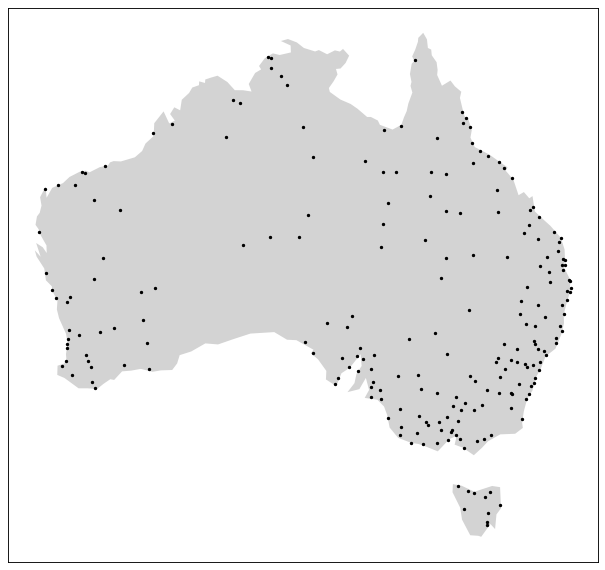
The Australian cities from Natural Earth designed for the 1:10m scale#
The K-Means clustering algorithm can be used used to reduce the amount of points by forming clusters based on the spatial proximity of the cities. In selection mode, like the following image shows, only the city with the largest population are kept.
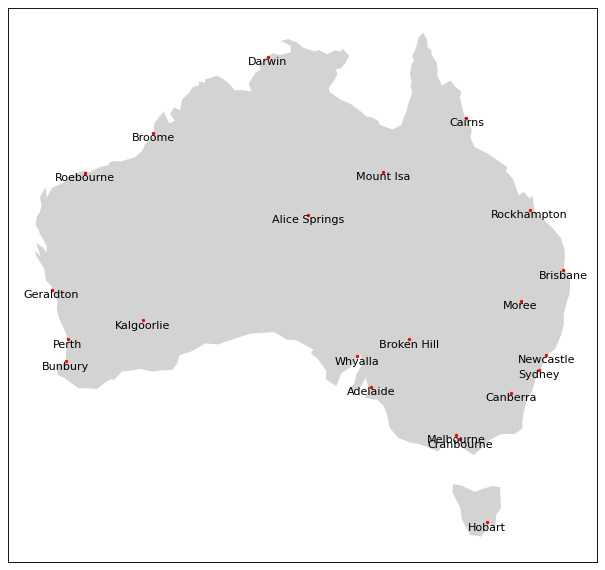
The Australian cities reduced by the K-Means method with a shrink ratio of 0.1 (10% of the cities are kept) and keeping the city with the largest population for each cluster.#
On the other hand, the Quad Tree based algorithm in selection mode can be used for the same purpose. This method can be interesting to adress the same issue and is quicker as the amount of points is recursively divided while the quad tree depth rises.

World’s cities reduced using the Quad Tree method with a depth of 3 by selection on the largest population#
Finally, the Label Grid algorithm can also be used in selection mode, like the Quad Tree, but uses a regular grid of a given size and shape.

World’s cities reduced using the Label Grid method with an hexagonal grid of 500,000x500,000 meters by selection on the largest population#
Covering#
Covering algorithms are used to transform points into surfaces. For now, two methods are available, which are:
The Delaunay method can only create a single polygon, thus, if you want to use this method, you should first generate clusters using the right library, such as scikit-learn clustering, and then create the hulls for each cluster. On the other hand, the swinging arm algorithm can create multiple polygons as can be seen on the following image.
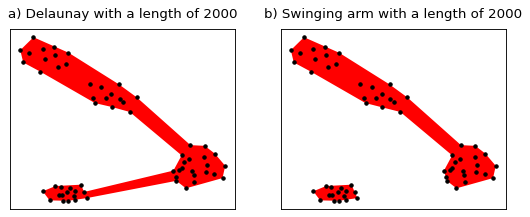
Comparison of the two covering methods#
Heatmap#
CartAGen also proposes a Heatmap
[5] function to visualize the density of points within a dataset.
For example, we can display the density of Australian cities weighted by the population.
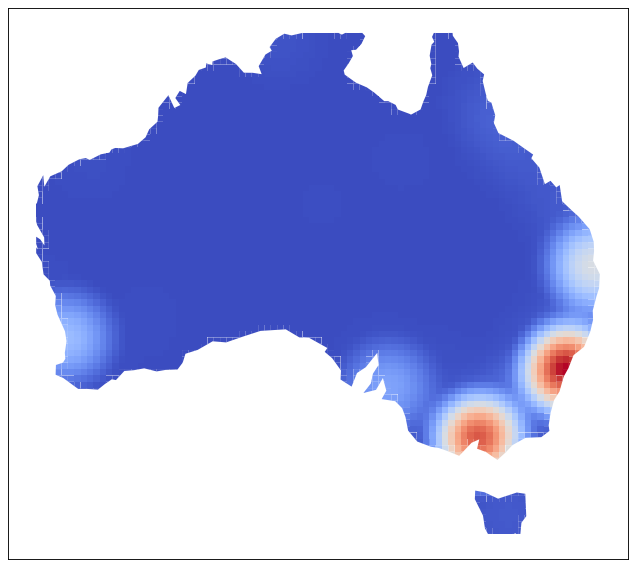
The density of cities in Australia weighted by the population#
Lines#
Simplification#
Multiple algorithms for line simplification are available, including:
Those line simplification algorithm are used for different purposes and their computational time differs. For example, Douglas-Peucker and Visvalingam-Whyatt are often used to simplify roads or surfaces borders such as forests. On the other hand, Raposo, Li-Openshaw and Whirlpool are usually applied to simplify natural lines like the hydrographic network. You can read more about them in the API Reference section.

Line simplification algorithms#
Smoothing#
Multiple algorithms for polyline smoothing are available, including:
The gaussian smoothing is the most well-known smoothing algorithm for polylines, it attenuates inflexions in the line but isn’t specialized in anything. On the other hand, PLATRE is designed to preserve sharp turns and attenuate minor bends while Taubin is used to prevent shrinkage of bends that is characteristic of the gaussian smoothing. Snake smoothing treats the geometry as an elastic snake optimizing an energy functional, you can modify internal constraints and external forces to best suit the context of your data. Topographic smoothing is a meta-algorithm that starts with a WMA smoothing followed by an angular simplification, this creates a hand-drawn older style of line generalization.

Polyline smoothing algorithms#
CartAGen also contains two smoothing algorithms that relies on the iterative creation of vertexes:
Catmull-Rom smoothing preserves the original vertexes of the line and link them with spline curves while Chaikin cut the corners of the original line.
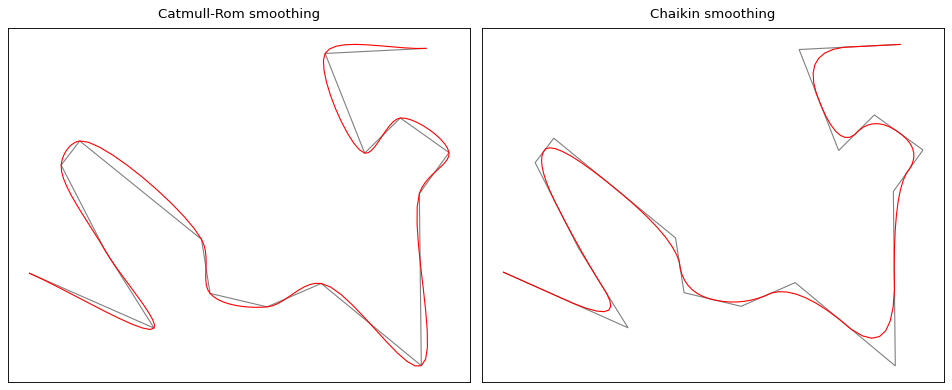
Comparison between Catmull-Rom and Chaikin#
Polygons#
Buildings#
CartAGen also contains algorithms that process any type of polygons, and others specific to some types of map polygons, such as buildings. This section contains only informations related to algorithms that process one polygon at a time. If your buildings seems to be adapted to your current scale, you can still run a squaring algorithm to correct angles that are almost flat, right, or at 45 degrees, using:
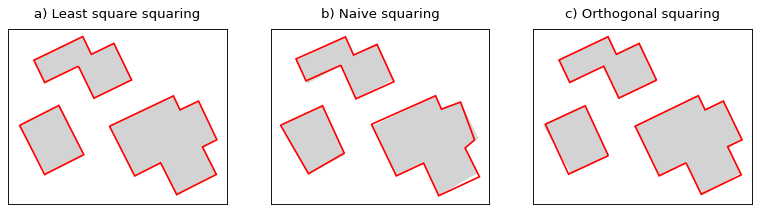
Building squaring algorithms#
If you want to modify further the geometry of the building, you can use simplification algorithms, such as:
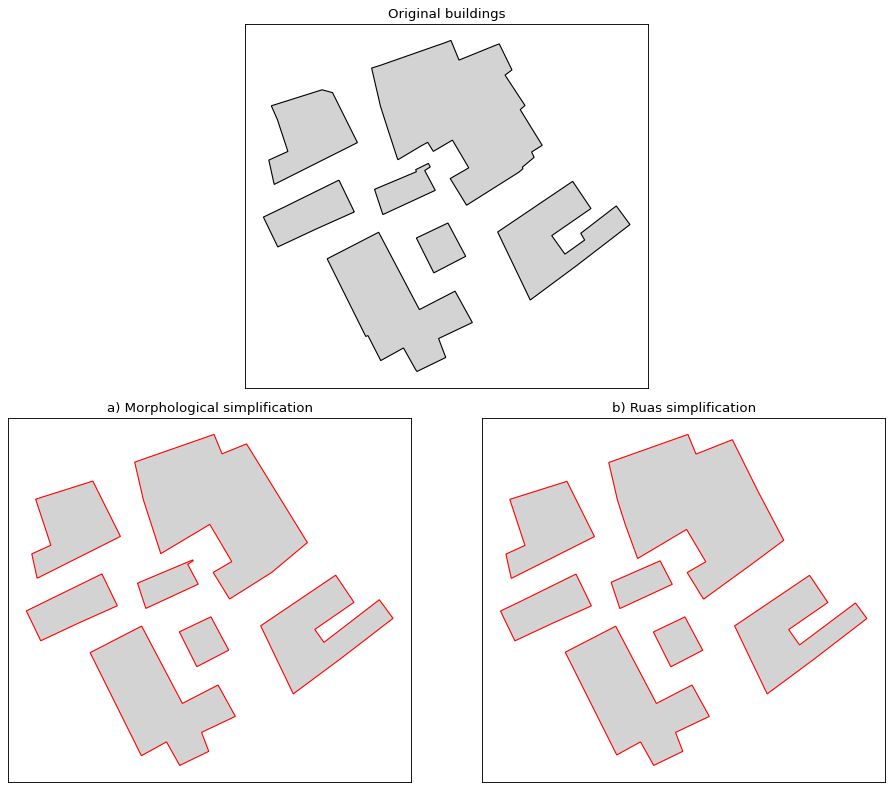
Building simplification#
The building simplification algorithm is a simple algorithm design to reduce the complexity of buildings by removing edges.
CartAGen contains algorithms designed to process buildings computed from segmentation of aerial or satellite images. Those algorithms can drastically
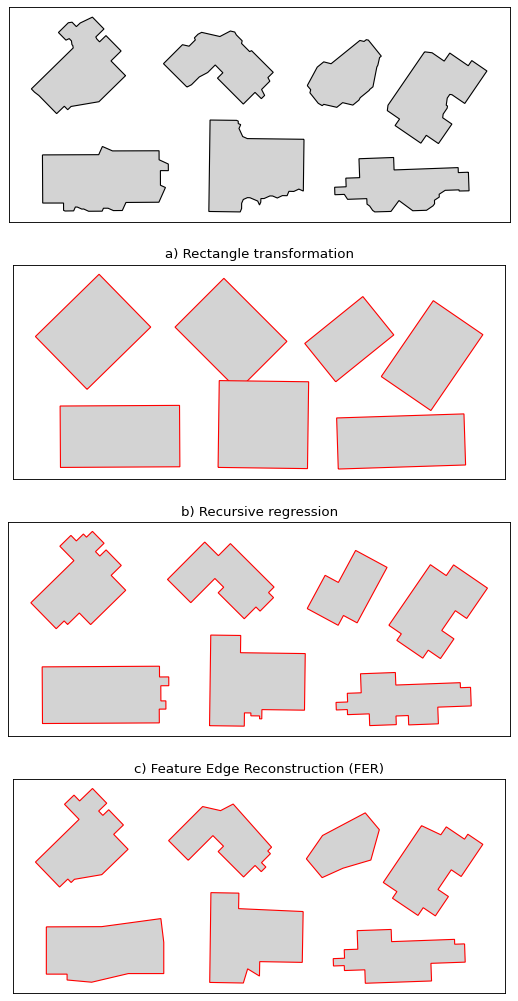
Building regularization algorithms#
Recursive regression can be quite destructive and is will always return 45 degrees angles. On the other hand, the rectangle transformation is mostly used inside more complex algorithms, such as AGENT as a possible branch inside a decision tree. Feature edge reconstruction is a complex algorithm with a decision tree that is design to keep the overall shape of the building.
CartAGen also contains algorithms that process several buildings at a time, usually to create amalgamated representation of buildings.

Building amalgamation algorithm#
Building blocks#
A building block can be defined as several buildings inside the face of a road network, and usually in an urban area to have a high enough density to require generalisation. Different operations can then be applied depending on factors such as the density of buildings and the final scale of the map.
At large scale, maybe we need to keep the individual buildings without modifying their geometry and the
space inside the building block is enough for the buildings to be moved. Thus,
we can use the random displacement algorithm, or the
simulated annealing displacement algorithm.
Still at large scale, sometimes there is not enough space inside the building block to move
the buildings around. It often is the case in urban areas, where buildings are touching each other.
So, you may want to aggregate those buildings into a representation of the building blocks that takes
into consideration the shapes of the individual buildings. For that purpose, you can use the
morphological amalgamation [29]
and recreate the building blocks.

Morphological amalgamation of buildings into building blocks#
Urban areas#
Sometimes, you will need to generate a representation of an urban area.
This can be achieved by representing the extent of the buildings if you
consider your buildings as representative of the urban area.
This can be done using the algorithm to calculate
Boffet area. [30]
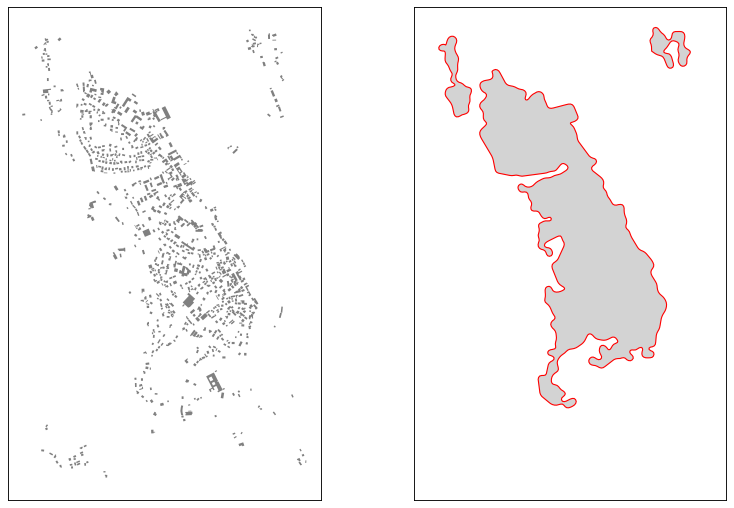
Boffet areas with a small gaussian smoothing applied to the result#
Typification#
In dense suburban areas, you might want to use typification to enhance the legibility of the map. We currently have two typification algorithms:
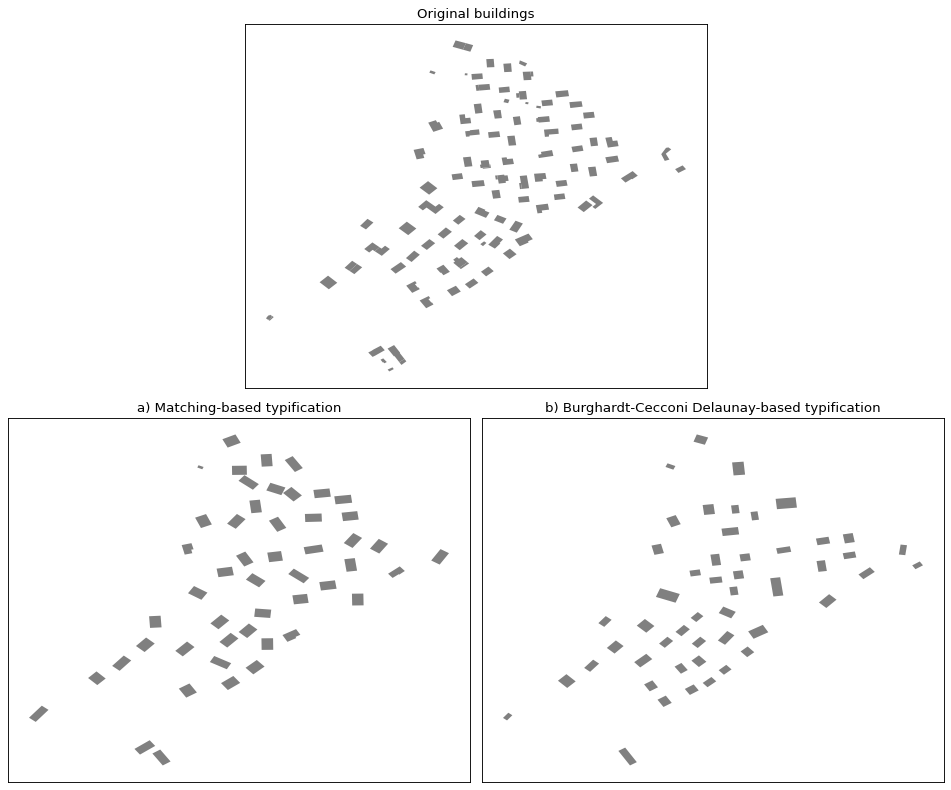
Building typification in dense urban areas#
Networks#
CartAGen also proposes network-related algorithms intended for the generalisation of different type of artificial or natural linear networks.
Roads#
Road networks algorithms are designed to detect or collapse specific road network features such as roundabouts, branching crossroads or dual carriageways. They can be dependent on each other, for example, collapsing roundabouts depends on both roundabout detection and branching crossroads detection to yield better results.
Having that in mind, the following section illustrates an example of a network generalisation workflow using network enrichment functions and collapsing algorithms. Let’s consider the following road network as the base data, which has too much detail for the scale we want.
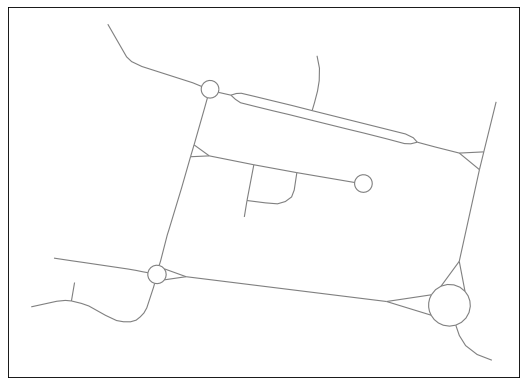
The original road network.#
It is advised to make your network planar before using any generalisation algorithms as it will avoid most issues afterwards.
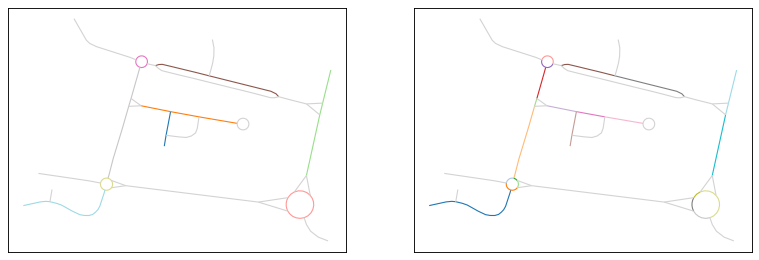
The original network (left) and the network made planar (right). The color are used only on non-planar edges to show their geometries.#
Roundabouts and branching crossroads#
We can start by using detect_roundabouts followed by
detect_branching_crossroads to respectively
detect roundabouts and then branching crossroads. We can specify detected roundabouts as
an input when detecting branching crossroads, that way, when those two objects are connected,
they can be treated as one object when collapsing.
# The variable network is a GeoDataFrame of LineString representing
# the network to generalise
roundabouts = detect_roundabouts(network)
crossroads = detect_branching_crossroads(network, roundabouts)
Then, we can apply collapse_branching_crossroads
followed by collapse_roundabouts to collapse those
shapes and simplify the network. The order is important as the first will collapse branching
crossroads that are not connected to roundabouts, and then collapse roundabouts and mixed
objects (roundabouts with incoming branching crossroads).
network = collapse_branching_crossroads(network, crossroads)
network = collapse_roundabouts(network, roundabouts, crossroads)
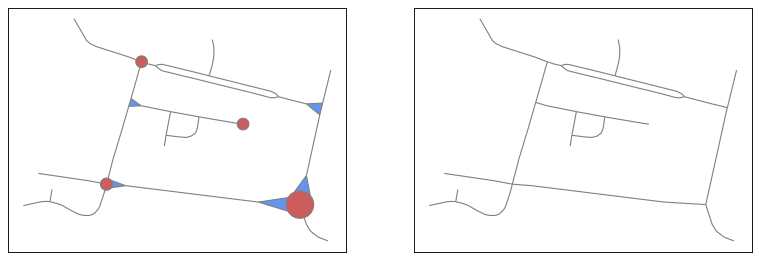
Collapsing roundabouts (in red) and branching crossroads (in blue) inside the road network.#
Dual carriageways#
We can now detect dual carriageways using
detect_dual_carriageways…
carriageways = detect_dual_carriageways(network)
…and collapse them using
collapse_dual_carriageways.
network = collapse_dual_carriageways(network, carriageways)
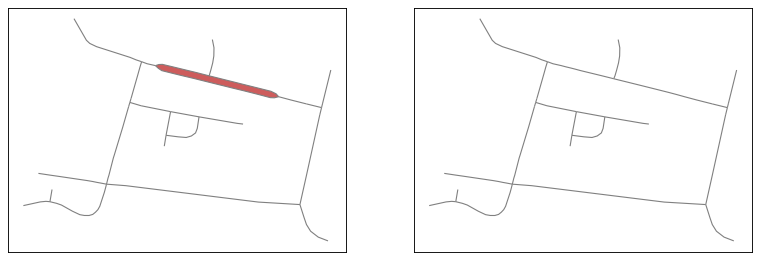
Collapsing dual carriageways inside the road network.#
Dead ends#
Now, we can detect dead-ends by using detect_dead_ends.
This stage can be deployed at the discretion of the cartographer as it can be used to
clean up the network. Here, we used this after collapsing branching crossroads as the
dead-end located at the center of the current network would not have been detected.
You can read more about how dead-ends are detected in their API reference page.
network = detect_dead_ends(network, True)
Finally, we can eliminate dead-end groups using eliminate_dead_ends
that are shorter than 200 meters and simplify long dead-end groups by keeping only the longest path.
network = eliminate_dead_ends(network, 200, keep_longest=True)
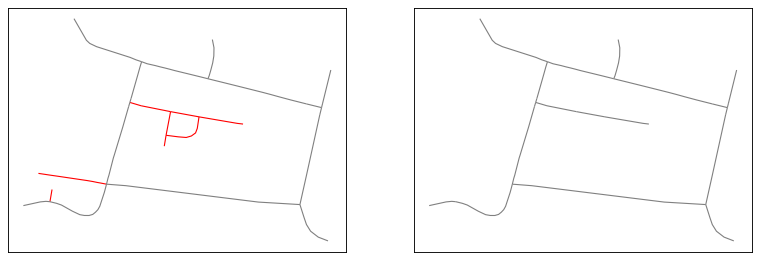
Eliminate or simplify dead-end groups (in red) inside the network.#
We can then compare our input network and our result to see how the network generalisation simplified the roads layout details in order to represent them at a larger scale. Keep in mind that generalisation of a road network is a complex process and sometimes algorithms can have a hard time finding specific features. For example, you could have a branching crossroad that is not triangular, and thus, it won’t be detected as one. This is a reminder that good generalisation relies on the cartographer’s validation at the end of the process.
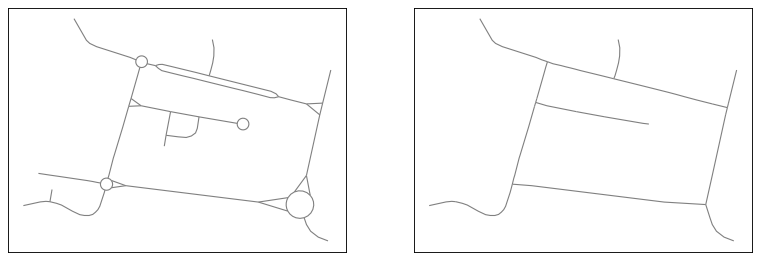
The original network (left) and the network after generalisation (right).#
Complex junctions#
For now, only one algorithm is designed to work on complex junctions,
collapse_junctions. It is mostly used
on highway interchanges, but it can lead to weird output and may not be suited for
every use cases.
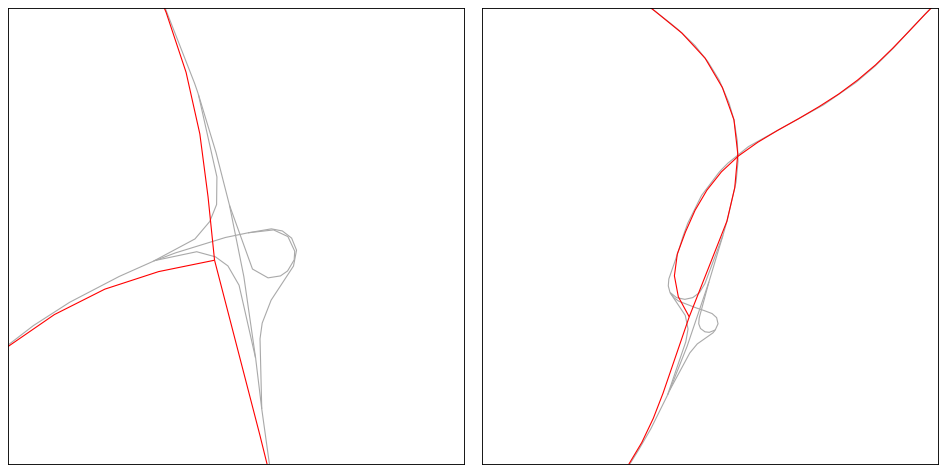
The original network (left) and the network after generalisation (right) and smoothing.#
Processes#
AGENT#
Agent-based generalization follows a step by step, knowledge based approach, which arises from the seminal model from Ruas & Plazanet [33]. The aim is not to find a global solution to generalize the whole map at once, but to identify local situations that require generalization, and try generalization algorithms to improve the legibility of this situation.
This process is a port of the version present in the CartAGen Java application. For a better understanding of the AGENT process, you can refer to Barrault et al. [34], Ruas & Duchêne [35] and Duchêne et al. [36]
Micro-agents#
Micro-agents are the simpler kind of agents as they aim at generalising single cartographic features without consideration for their surroundings.
Assuming the variable buildings is a GeoDataFrame of Polygon, we
need to loop through buildings and add them as individual agent before
generalisation:
import cartagen as c4

agents = []
for i, building in buildings.iterrows():
    # Create the agent
    agent = c4.BuildingAgent(building)

    # Adding a size constraint of 250 square meters to enlarge the building if needed
    size = c4.BuildingSizeConstraint(agent, importance=1, min_area=250)

    # Adding a granularity constraint that will simplify the building if
    # an edge is above the minimum allowed length
    granularity = c4.BuildingGranularityConstraint(agent, importance=1, min_length=6)

    # Adding a squareness constraint to square the building angles if needed
    squareness = c4.BuildingSquarenessConstraint(agent, importance=1)

    agent.constraints.append(size)
    agent.constraints.append(squareness)
    agent.constraints.append(granularity)
    agents.append(agent)

c4.run_agents(agents)
Below is a table representing the different constraints available for the building generalisation using AGENT along with their associated actions.
Name |
Property |
Actions |
|---|---|---|
BuildingSizeConstraint |
area |
enlarge, delete |
BuildingGranularityConstraint |
granularity |
simplify, simplify to rectangle |
BuildingSquarenessConstraint |
squareness |
squaring |

Resulting generalisation using the micro-agents#
Least squares-based method#
CartAGen also propose a generalisation method based on the method of least squares. This method was proposed by Harrie [37] and relies on the least squares regression to displace every vertexes of every provided objects (points, lines and polygons). Those vertexes can move but they need to respect user-provided constraints. In practice, it iteratively tries to resolve matrice equations until a threshold norm is reached keeping every constraints as satisfied as possible.
Setup#
As en example, let’s start with a set of three geographic objects (example in the image below), namely some buildings (in gray), a simple road network (in red) and a river (in blue).
Let’s consider those objects are too close to each other at the scale we want to represent them. We can start by instanciating the least squares method class with default parameters:
ls = cartagen.LeastSquaresMethod()
Constraints#
But we also want to specify constraints to maintain some control over the movement of vertexes. Using the following table, we can specify different constraints for the different objects:
Constraint |
Geometry type |
Impact |
|---|---|---|
movement |
Point, LineString, Polygon |
The object should move as little as possible |
stiffness |
LineString, Polygon |
The internal geometry should be invariant, i.e. the vertexes movement within the same object will try not to move closer or away from each other. |
curvature |
LineString, Polygon |
The curvature of a line or a polygon border should not change, i.e. the angle formed by two connected segments will try not to change. |
Having that in mind, we can add the different objects with the constraints properly set. The numbers represent the weight of the constraint. A higher value means the constraint will be more respected during generalisation. So, in the following example, the buildings have a high stiffness which means there shape will tend to stay the same:
ls.add(buildings, movement=2, stiffness=10)
ls.add(roads, movement=2, curvature=5)
ls.add(rivers, movement=2, curvature=5)
Spatial relationships#
We decided to let users more freedom when setting the spatial conflict constraints. Thus, we can decide the distance and weight of spatial conflicts between each pair of objects we already added. So, we need to provide two matrices: one for the distances between pairs of objects, one for the weight of those spatial constraints.
First, we retrieve the number of objects added for generalisation. This should be 3: buildings, roads, rivers:
d = ls.get_objects_number()
We can then create two numpy arrays of the right shape:
distances = np.zeros((d, d))
spatial_weights = np.zeros((d, d))
We then can populate the new arrays with default distance and weight values:
for i in range(d):
    for j in range(d):
        distances[i][j] = 20
        spatial_weights[i][j] = 5
Those two arrays represent the spatial conflicts and the weight of those conflicts between each pairs of objects. So, by setting a default distance, we will force objects to have at least 20 meters between each other.
But maybe we want to allow buildings to be closer to each other and further away from the rivers.
To change those distances, we can use ls.distances[n][m] where n and m are
respectively the index of the pair of object we want to modify in the order we added them.
Let’s say we want buildings to be at least at 25 meters from each other, 28 meters from the roads and 30 meters
from the rivers, we can do:
distances[0][0] = 25
distances[0][1] = 28
distances[0][2] = 30
The distances variable now return:
[[25. 28. 30.]
 [20. 20. 20.]
 [20. 20. 20.]]
And if we want to increase the weight of the spatial conflict between the roads and the rivers, we can change it this way:
spatial_weights[1][2] = 8
The spatial_weights variable now return:
[[5. 5. 5.]
 [5. 5. 8.]
 [5. 5. 5.]]
Finally, we can add the spatial relationships to the least squares method:
ls.add_spatial_conflicts(distances, spatial_weights)
Results#
Finally, we can launch the generalisation that will return a tuple with as many as objects we added:
buildings, roads, rivers = ls.generalise()

Geographic objects before generalisation#
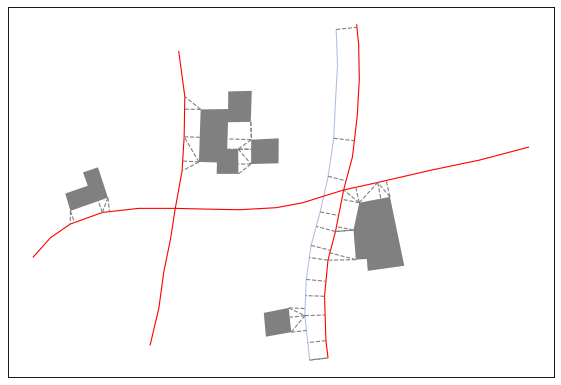
Spatial conflicts detected#
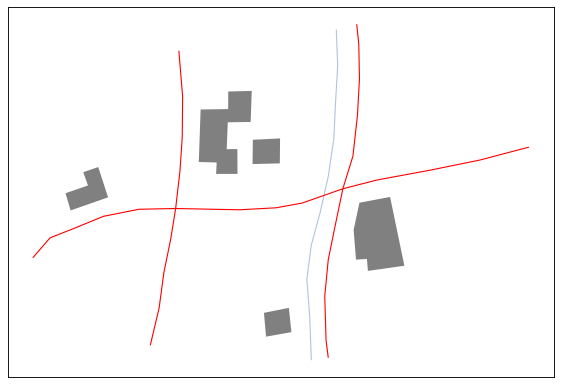
Results of the generalisation#