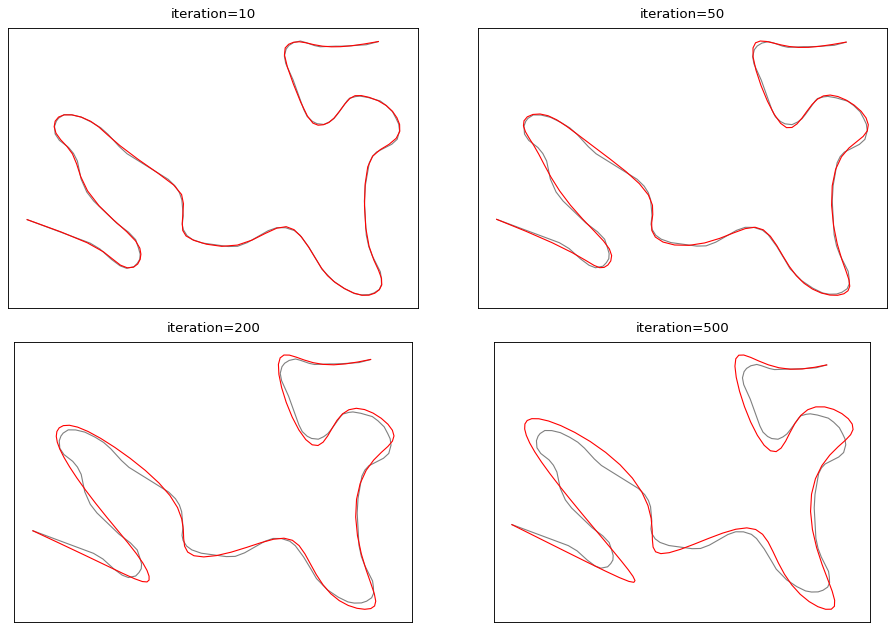
cartagen.smooth_taubin#
- smooth_taubin(geometry, iterations=10, smoothing=0.5, inflation=-0.53)#
Smooth a line or polygon and prevent shrinkage.
This algorithm was proposed by Taubin [1]. It is a two-step low-pass filter that preserves volume and prevents shrinkage. It applies alternating expansion and contraction steps using lambda (smoothing) and mu (inflation) parameters.
Accept Multi geometries. If a polygon is provided, it also applies the smoothing to its holes using the same parameters.
This implementation is a translation of the C++ implementation available here.
- Parameters:
geometry (
LineString,MultiLineString,Polygon,MultiPolygon,LinearRing) – The line or polygon to smooth. If a line is provided, the first and last vertices are kept fixed. If a closed ring or polygon is provided, all vertices are smoothed.iterations (
int, optional) – Number of smoothing iterations. Default is 10. More iterations result in stronger smoothing.smoothing (
float, optional) – Smoothing factor for the first pass. Default is 0.5. Should be positive and typically between 0 and 1.inflation (
float, optional) – Inflation factor for the second pass. Default is -0.53. Should be negative with inflation slightly larger than smoothing to prevent shrinkage.
- Returns:
LineString,Polygon,MultiLineString,MultiPolygon,LinearRing– Smoothed geometry of the same type as input.
See also
smooth_gaussianSmooth a line or a polygon and attenuate its inflexion points.
smooth_platreSmooth a line and preserve the integrity of sharp turns.
smooth_snakeSmooth a line or polygon using the snake method.
smooth_topographicSmooth a line or polygon and mimic hand-made cartographic generalization.
smooth_wmaSmooth a line or polygon using a low-pass filter.
References
Examples
>>> line = LineString([(0, 0), (1, 1), (2, 0), (3, 1), (4, 0)])
>>> smooth_taubin(line, smoothing=0.5, iterations=5)
<LINESTRING (0 0, 1.2 0.8, 2 0.3, 2.8 0.8, 4 0)>
>>> polygon = Polygon([(0, 0), (0, 2), (2, 2), (2, 0), (0, 0)])
>>> smooth_taubin(polygon, smoothing=0.3, iterations=10)
<POLYGON ((0.2 0.2, 0.2 1.8, 1.8 1.8, 1.8 0.2, 0.2 0.2))>