cartagen.smooth_wma#
- smooth_wma(geometry, iterations=1, weights=[1.0, 2.0, 1.0])#
Smooth a line or polygon using a low-pass filter.
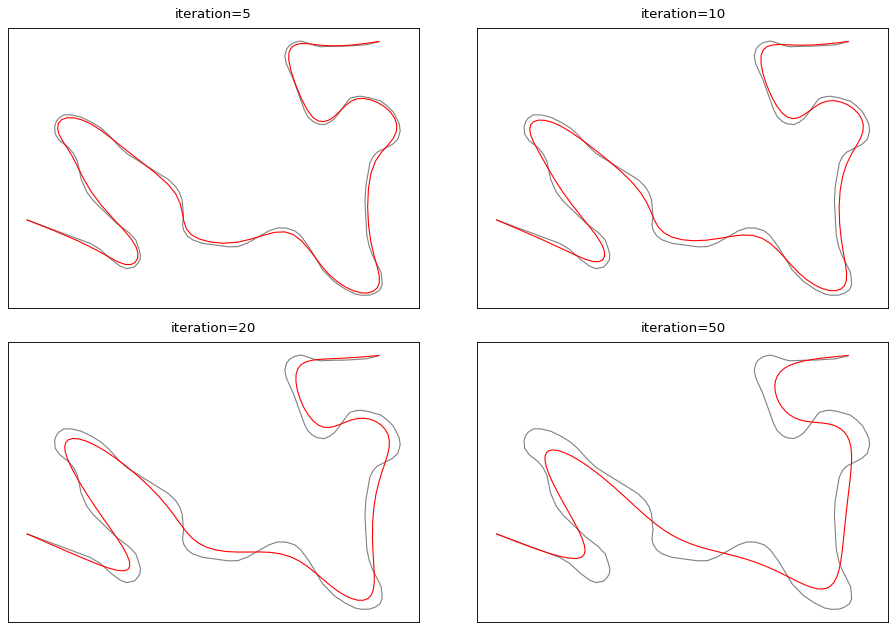
This algorithm described in McMaster [1] for a generalization purpose applies a weighted moving average (WMA) window over the vertices. The default weights [1, 2, 1] heavily weight the central point to suppress unwanted short-wavelength noise while minimizing overall geometric shrinkage.
Accept Multi geometries. If a polygon is provided, it also applies the smoothing to its holes using the same parameters.
- Parameters:
geometry (
LineString,MultiLineString,Polygon,MultiPolygon,LinearRing) – The geometry to smooth. If an open line is provided, the endpoints are preserved. If a closed ring or polygon is provided, the smoothing wraps around.iterations (
int, optional) – Number of iterations to apply the filter. Default is 1.weights (
sequenceofodd length, optional) – Weights for the moving average window. Default is [1, 2, 1].
- Returns:
LineString,Polygon,MultiLineString,MultiPolygon,LinearRing– Smoothed geometry of the same type as input.
Notes
This algorithm can also become a simple moving average smoothing algorithm if you set the weights to [1, 1, 1].
See also
smooth_gaussianSmooth a line or a polygon and attenuate its inflexion points.
smooth_platreSmooth a line and preserve the integrity of sharp turns.
smooth_snakeSmooth a line or polygon using the snake method.
smooth_taubinSmooth a line or polygon and prevent shrinkage.
smooth_topographicSmooth a line or polygon and mimic hand-made cartographic generalization.
Examples
>>> line = LineString([(0, 0), (1, 1), (2, 0), (3, 1), (4, 0)])
>>> smooth_wma(line, 1)
<LINESTRING (0 0, 1 0.5, 2 0.5, 3 0.5, 4 0)>