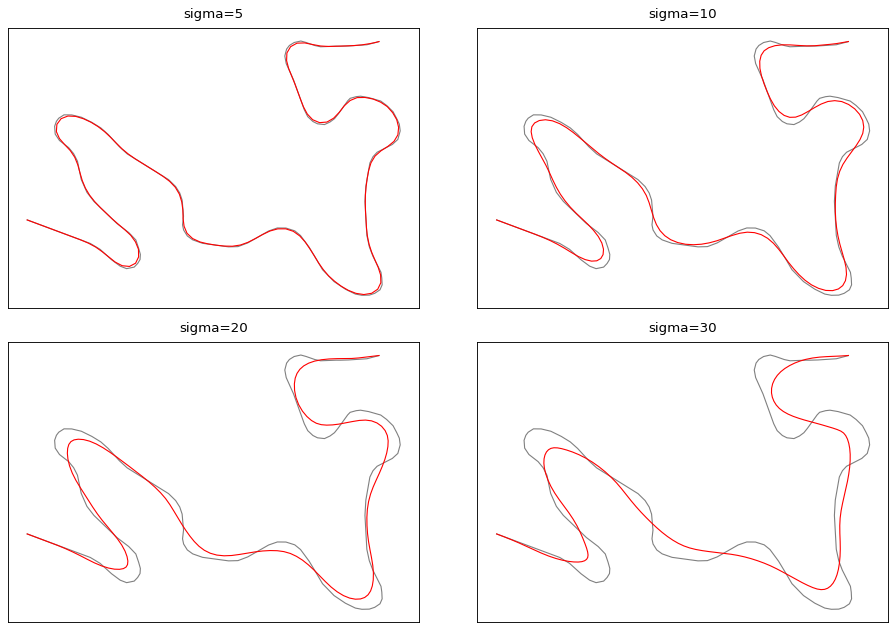
cartagen.smooth_gaussian#
- smooth_gaussian(geometry, sigma=30, sample=None, densify=True)#
Smooth a line or a polygon and attenuate its inflexion points.
The gaussian smoothing has been studied by Babaud et al. [1] for image processing, and by Plazanet [2] for the generalisation of cartographic features.
Accept Multi geometries. If a polygon is provided, it also apply the smoothing to its holes using the same parameters.
- Parameters:
geometry (
LineString,MultiLineString,Polygon,MultiPolygon,LinearRing) – The geometry to smooth. If a line is provided, the first and last vertexes are kept. If a polygon is provided, every vertex is smoothed.sigma (
float, optional) – Gaussian filter strength. Default value to 30, which is a high value.sample (
float, optional) – The length in meter between each nodes after resampling the geometry. If not provided, the sample is derived from the geometry and is the average distance between each consecutive vertex.densify (
bool, optional) – Whether the resulting geometry should keep the new vertex density. Default to True.
- Returns:
See also
smooth_platreSmooth a line and preserve the integrity of sharp turns.
smooth_snakeSmooth a line or polygon using the snake method.
smooth_taubinSmooth a line or polygon and prevent shrinkage.
smooth_topographicSmooth a line or polygon and mimic hand-made cartographic generalization.
smooth_wmaSmooth a line or polygon using a low-pass filter.
References
Examples
>>> line = LineString([(0, 0), (1, 1), (2, 0), (5, 3)])
>>> c4.smooth_gaussian(line, 1)
<LINESTRING (0 0, 1.666666666666667 0.6051115971014416, 3.333333333333334 1.6051115971014418, 5 3)>
>>> polygon = Polygon([(0, 0), (0, 1), (1, 1), (1, 0), (0, 0)])
>>> c4.smooth_gaussian(polygon, 1)
<POLYGON ((0.1168459780814714 0.3005282653219513, ... 0.1168459780814714 0.3005282653219513))>