cartagen.spinalize_polygon#
- spinalize_polygon(polygon, densify=None, sigma=None, entries=None, structural=None)#
Collapse a single polygon into one or multiple lines.
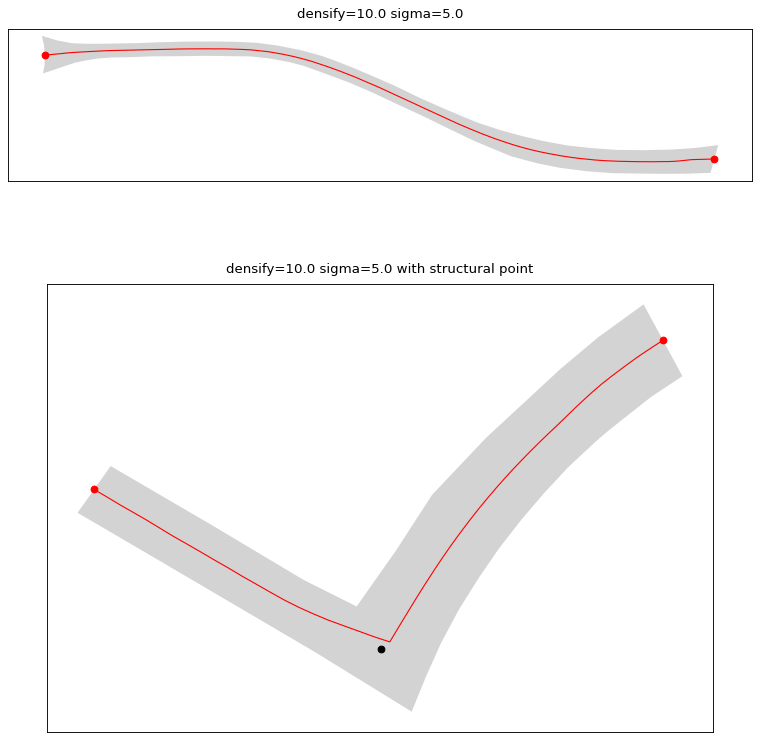
This algorithm creates the spine of a polygon to generate a line. It uses a Voronoi diagram from the list of vertices of the polygon. Then, depending on the provided entries, it calculates the closest path (using Djikstra) between those entries or between all vertexes.
More information about the usage of this algorithm in Touya & Girres [1] [2]
- Parameters:
polygon (
Polygon) – The polygon to spinalize.densify (
float, optional) – The densification step used to resample the polygon ring. If not provided, it can sometimes render the spinalization impossible because the generated Voronoi diagram doesn’t have enough nodes. If set to a too high value and no entries are set, computation time can skyrocket.sigma (
float, optional) – Gaussian filter strength. If set to None, no gaussian smoothing is applied.entries (
listofPoint, optional) –A list of entry points to the polygon.
If left to None, the spine is the longest path between all the nodes of the Voronoi diagram (this can be really expensive in terms of resources).
If one is set, the spine is the longest path between this point and all the nodes of the Voronoi diagram.
If two are set, the spine is the path between those two nodes on the Voronoi diagram.
If more than two are set, multiple spines are calculated between each nodes on the Voronoi diagram.
The last two are the most efficient in terms of computation time because it doesn’t calculate shortest paths to each node.
structural (
listofPoint, optional) – A list of point inside the polygon that will be kept by the algorithm. Each point is snapped to the closest vertex on the spine before the gaussian smoothing is applied in order to keep them. This is useful to preserve right angles inside the polygon for example.
- Returns:
listofLineString
Warning
The
densifyandentriesparameters, if not set correctly, can lead to extreme computation time. Read carefully the documentation to properly use this algorithm.See also
spinalize_polygonsCollapse multiple polgygons into one or multiple lines.
resample_lineDensify a line by adding vertices.
smooth_gaussianSmooth a line and attenuate its inflexion points.
References
Examples
>>> polygon = Polygon([(0, 0), (0, 10), (20, 10), (20, 0), (0, 0)])
>>> spinalize_polygon(polygon)
[<LINESTRING (0 5, 10 5, 20 5)>]