cartagen.spinalize_polygons#
- spinalize_polygons(polygons, densify=None, sigma=None, entries=None, structural=None)#
Collapse multiple polygons into one or multiple lines.
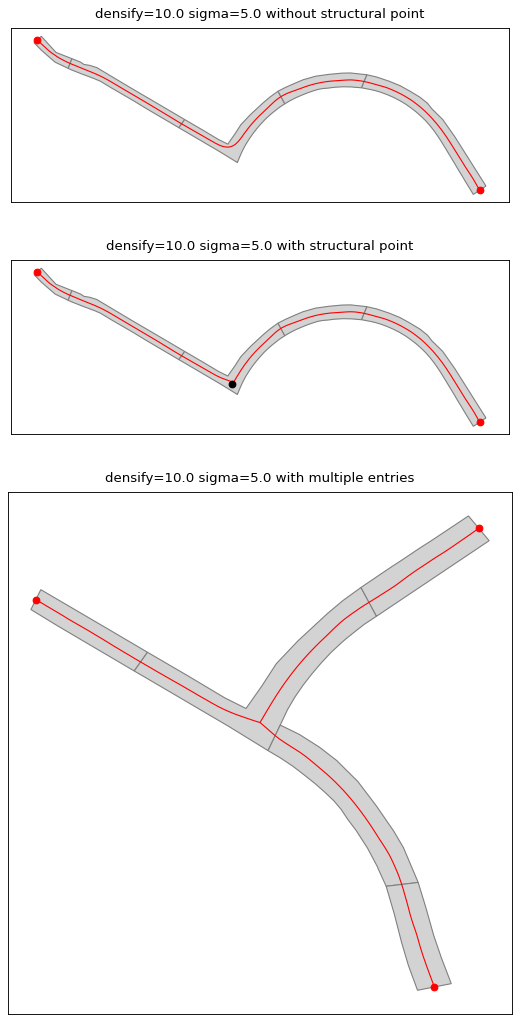
This algorithm creates the spine of the polygons to generate a line. When polygons touches each other, the generated spine is the union of all the touching polygons individual spine. Entry points are calculated as the middle of the line where polygon touches to avoid high computation time.
More information about the usage of this algorithm in Touya & Girres [1] [2]
- Parameters:
densify (
float, optional) – The densification step used to resample the polygon ring.sigma (
float, optional) – Gaussian filter strength.entries (
listofPoint, optional) – A list of entry points to the polygon. When two polygons touches, an entry point is created, and it is the middle of the LineString representing the intersection between those two polygons.structural (
listofPoint, optional) – A list of point inside the polygon that will be kept by the algorithm.
- Returns:
listofLineString
Warning
Please read the documentation of the
spinalize_polygon()function because some parameters can cause extreme computation time.See also
spinalize_polygonCollapse multiple polgygons into one or multiple lines.
References
Examples
>>> polygons = [Polygon([(0, 0), (0, 10), (20, 10), (20, 0), (0, 0)]), Polygon([(20, 0), (20, 10), (40, 10), (40, 0), (20, 0)])]
>>> spinalize_polygons(polygons)
[<LINESTRING (0 5, 10 5, 20 5, 30 5, 40 5)>]