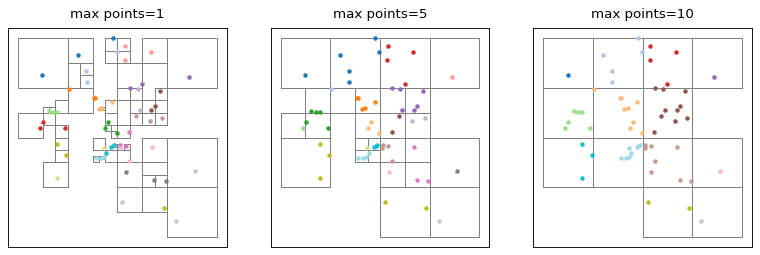
cartagen.partition_quadtree#
- partition_quadtree(objects, max_points=1, max_depth=None)#
Partition objects using a quadtree.
This algorithm inserts the centroids (or surface points) of the provided objects into a quadtree built over the extent of the dataset, then collects the leaf cells and assigns each object to the leaf it was placed in.
- Parameters:
objects (
GeoDataFrame) – The objects to partition. Supports Point, LineString, and Polygon geometries.max_points (
int, optional) – Maximum number of points a quadtree node can hold before it subdivides. Lower values produce finer partitions. Defaults to 1.max_depth (
int, optional) – Maximum depth the quadtree is allowed to reach. Nodes at this depth will not subdivide further, even if they exceedmax_points. If set to None, depth is unlimited. Defaults to None.
- Returns:
partition (
tuple) – A tuple containing two elements:A list of lists of index ordered by the quadtree leaf cells
A list of the geometry of the quadtree leaf cells
See also
partition_gridPartition objects using a grid of a given shape.
partition_networksPartition objects using one or multiple networks.
Examples
>>> points = gpd.GeoDataFrame(geometry=[Point(1, 1), Point(3, 3)])
>>> partition_quadtree(points, max_points=1)
([[0], [1]], [<POLYGON (...)>, <POLYGON (...)>])