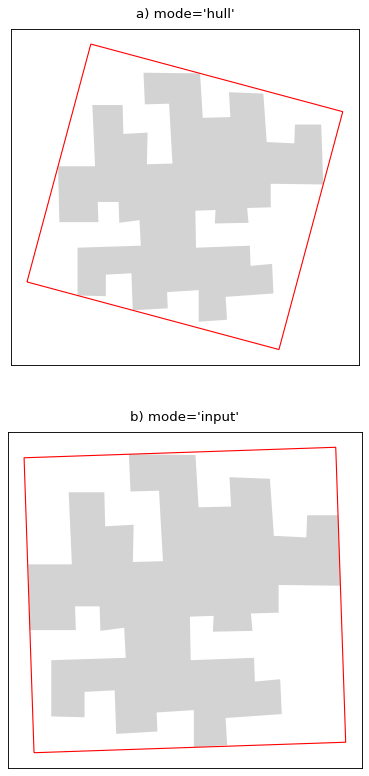
cartagen.enclosing_rectangle#
- enclosing_rectangle(polygon, mode='hull', property='minimum area')#
Construct an enclosing rectangle from a polygon.
This function relies on the rotating calipers algorithm proposed by Toussaint. [1] The idea is to simulate the rotation of a spring-loaded vernier caliper around the outside of a convex polygon. Using this approach, an enclosing rectangle can be calculated for each side of the convex hull of the polygon as described by Bayer, [2] and the fitting rectangle (usually the minimum area) can be retrieved.
- Parameters:
polygon (
Polygon) – The polygon to calculate its enclosing rectangle from.mode (
str, optional) – The type of enclosing rectangle wanted. In ‘hull’ mode, a rectangle is calculated for every side of the convex hull to return the right one. In ‘input’ mode, a rectangle is calculated only for the longest edge shared between the convex hull and the input polygon.property (
str, optional) – Which geometric property to consider to return the rectangle. This value can be ‘minimum area’, ‘maximum area’, ‘minimum length’, ‘maximum length’. The length represents the longest side of the rectangle.
- Returns:
Polygon– The enclosing rectangle. Its vertexes are ordered clockwise and it starts in its southwestern corner.
Notes
If ‘input’ mode is chosen and the provided polygon does not have a side that is the same as a side in its convex hull, (e.g. a star-shaped polygon) This algorithm returns the enclosing polygon calculated in ‘hull’ mode.
References
Examples
>>> polygon = Polygon([ (0, 0), (0, 1), (1, 1), (1, 2), (2, 2), (2, 0), (0, 0) ])
>>> enclosing_rectangle(polygon)
<POLYGON ((0 0, 0 2, 2 2, 2 0, 0 0))>